← All products

Create the matchday story

PostMAKER

Create matchday graphics for your club.

An offline-first graphics editor for match announcements, results, stories and social posts. The PWA and Windows desktop app share the same editor, templates, project format and rendering core.

Released · 0.3.0 · PWA and Windows x64Open PostMAKER ↗GitHub repository ↗
PostMAKER artwork

What it does

Built for the
work behind the game.

01 /

Post, story and square PNG exports

02 /

Reusable Brand Kit, templates, presets and GLASS layers

03 /

Public WebMAKER data import with local project storage

04 /

Offline-first PWA and Windows desktop app with no account required

Get the software

Versions &
downloads.

Windows installers appear here only after a release includes a verified executable asset.

Progress by version

Changelog.

Stable release

0.3.0

  • Windows desktop application using the same React and TypeScript editor as the PWA.
  • Native file dialogs, explicit JSON project files, portable JSON and ZIP backups, and PNG export.
  • Shared Brand Kit, presets, templates, GLASS layers and validated public WebMAKER data import.

Read release notes ↗

How to use it

Tutorial.

PostMAKER 0.3.0 is available as an offline-first PWA and a Windows x64 desktop application. Both use the same editor, project schema, templates and rendering core. Core editing requires no account, GitHub login or internet connection.

Open PostMAKER ↗ · Full user guide ↗

For users

Install & use PostMAKER

Start in the browser, install the PWA, or use the Windows desktop app. Keep explicit backups wherever you work.

  1. 01 / Choose the app

    Open the PWA or install Windows

    Open PostMAKER in your browser ↗. After one complete online visit, use your supported browser's install command to add the PWA. That first successful visit is required before offline use.

    For Windows x64, use the recommended EXE installer ↗ or the alternative MSI ↗. The installers are unsigned, so Windows may show Unknown publisher. Follow your organization's security policy. Desktop automatic updates are disabled.

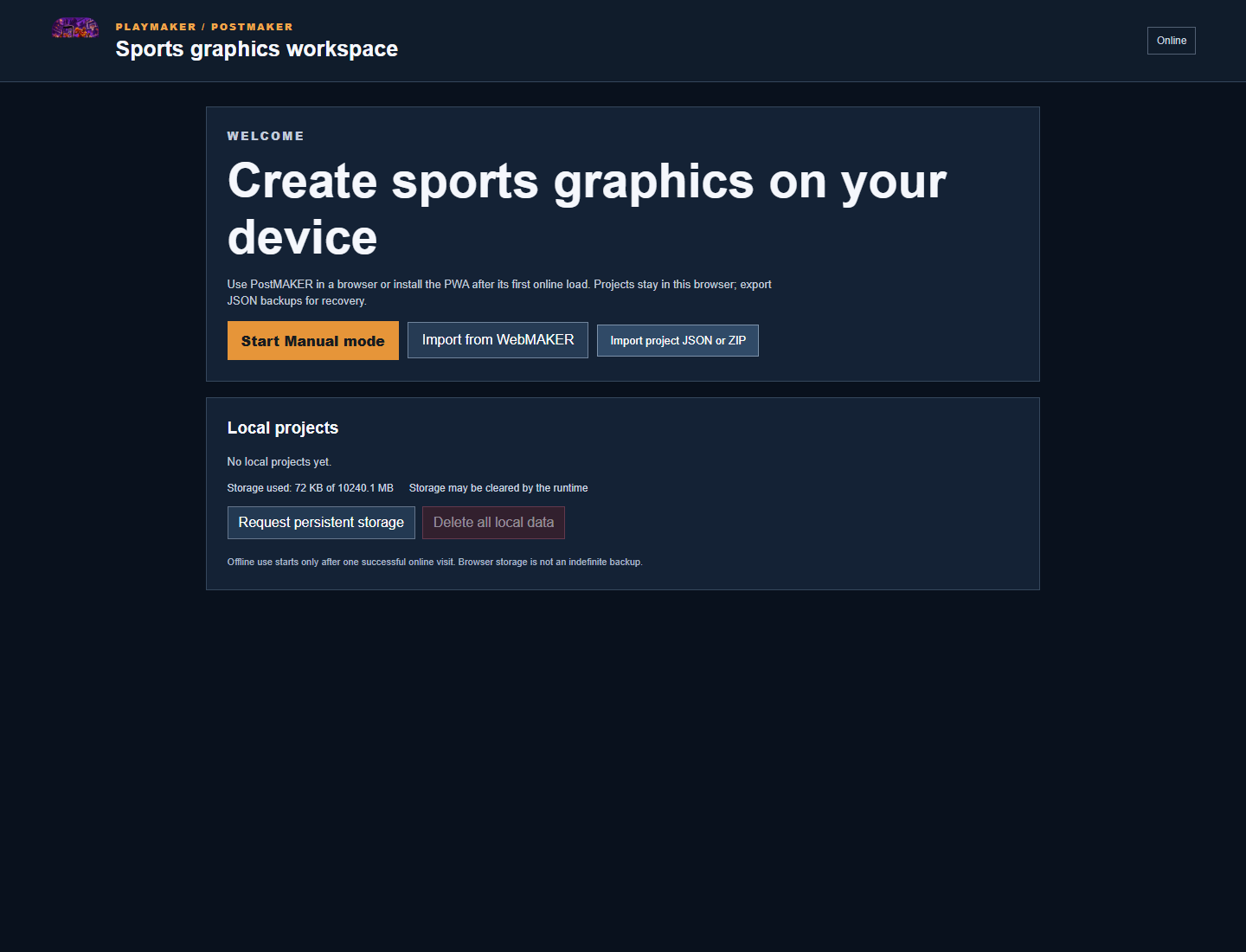
    Screenshot of the real PostMAKER PWA welcome screen with Manual mode, WebMAKER import and project backup actions
    The PostMAKER 0.3 PWA welcome screen using an empty local project list. Screenshot.
  2. 02 / Project

    Create or import a project

    Choose Start Manual mode, name the project and create a graphic in post, story or square format. Choose Import from WebMAKER to validate a local public-data JSON file or a public HTTPS source before adding club information and fixtures. PostMAKER does not need GitHub access for either path.

  3. 03 / Brand Kit

    Set the reusable club identity

    Add the club name, colors, system fonts, logos, teams, sponsors and other approved assets. Save useful compositions as presets. Add only media you have permission to publish, and record the license or permission for sponsor and brand assets.

  4. 04 / Match graphic

    Build the composition

    Add match details and scores, choose a template, then arrange text, image, shape and GLASS layers. Upload a background photograph and adjust its crop, zoom or blur. A transparent subject overlay should use the same source dimensions as the background image so both layers align correctly.

  5. 05 / Export

    Export the finished PNG

    The live preview uses the same renderer and dimensions as the PNG export. Export post, story or square graphics. Compatible mobile browsers can open the operating system share sheet; other browsers download the PNG. PostMAKER does not post directly to social networks.

  6. 06 / Backups & offline

    Keep recoverable project files

    Browser projects are stored locally in IndexedDB, which can be cleared and is not a permanent backup. Export JSON or ZIP backups regularly. The Windows app adds native file dialogs, explicit project files and PNG export. The same JSON or ZIP project can be opened in the PWA and desktop app.

    Core editing works offline. Remote images and HTTPS WebMAKER refreshes still need a connection. Desktop automatic updates are not enabled, so install future approved releases manually.

For contributors & developers

Improve PostMAKER

The public repository contains the shared React editor, Canvas renderer, data connectors, PWA and thin Tauri 2 Windows shell.

1. Clone and run the checks

Use Node.js 22 or newer. Create a focused branch and keep generated output, personal files and real club data out of commits.

git clone https://github.com/PlayMAKER-apps/postmaker.git
cd postmaker
npm ci
npm run lint
npm test
npm run build

2. Test the browser workflow

Playwright covers local storage reload, backup import, PNG download, the Pages base path and offline reload. Use fictional projects and licensed or synthetic media.

npx playwright install chromium
npm run test:e2e

3. Preserve one shared editor

apps/web serves the browser and Tauri desktop modes. Keep project schema, templates and rendering behavior shared. New stored formats need explicit validation and nondestructive migrations.

4. Review data contracts

Changes to WebMAKER import must remain compatible with the shared PlayMAKER schema ↗. Open an Issue or pull request with the user workflow, tests and documentation changed together.

Built in the open

Explore the code.

The PostMAKER repository contains the shared React editor, Canvas renderer, PWA, Tauri 2 desktop shell, tests and user guides.

Open GitHub repository ↗